指令合并
- 值指令可以合并 root,gzip,access_log 等
- 动作指令不可以合并 proxy_pass,rewrite等
合并规则
- 子配置不存在时,直接使用父模块
- 子配置存在时,覆盖父模块配置
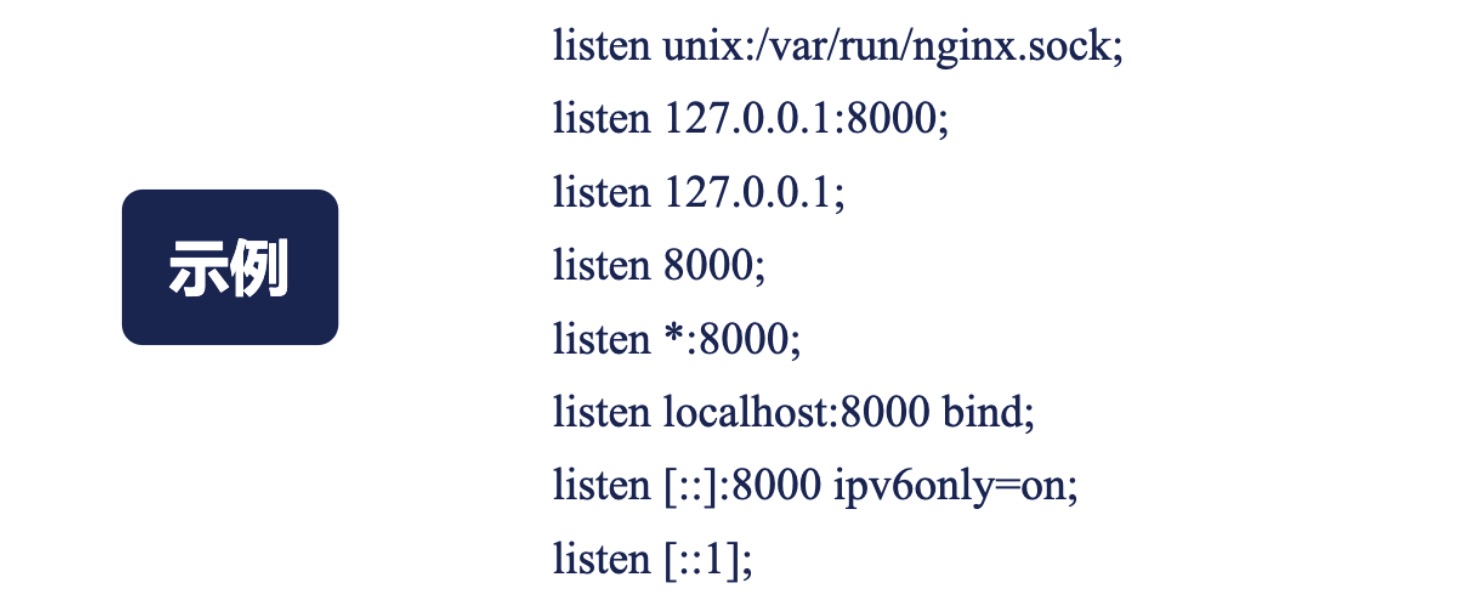
listen 指令 示例
server_name 指令
- 指令后跟多个域名
- 泛域名
- 正则表达式 (可创建变量)
匹配顺序
- 精准匹配
- *在前的泛域名
- *在后的泛域名
- 按文件中的顺序匹配正则表达式
- default 值
http 请求11个阶段
如何拿到用户的真实ip
由于网络中存在许多反向代理,所以无法从tcp四元组中获得 http头 X-Forwarded-For 用于传递ip 可以为数组 http头 X-Real-IP 用于传递用户ip 单个值
rewrite 模块
return 指令 与 error_page
Syntax:	return code [text];
return code URL;
return URL;
Default:	—
Context:	server, location, if
Syntax:	error_page code ... [=[response]] uri;
Default:	—
Context:	http, server, location, if in location
rewrite 指令
Syntax:	rewrite regex replacement [flag];
Default:	—
Context:	server, location, if

An optional flag parameter can be one of:

last
stops processing the current set of ngx_http_rewrite_module directives and starts a search for a new location matching the changed URI;
break
stops processing the current set of ngx_http_rewrite_module directives as with the break directive;
redirect
returns a temporary redirect with the 302 code; used if a replacement string does not start with “http://”, “https://”, or “$scheme”;
permanent
returns a permanent redirect with the 301 code.
rewrite_log on | off; 打开重定向日志
if 指令
```shell script Syntax: if (condition) { … } Default: — Context: server, location
## location 指令
```shell script
Syntax:	location [ = | ~ | ~* | ^~ ] uri { ... }
location @name { ... }
Default:	—
Context:	server, location
- = : 表示精确匹配后面的url
- ~ : 表示正则匹配,但是区分大小写
- ~* : 正则匹配,不区分大小写
- ^~ : 表示普通字符匹配,如果该选项匹配,只匹配该选项,不匹配别的选项,一般用来匹配目录
- @ : “@” 定义一个命名的 location,使用在内部定向时,例如 error_page
| *merge_slashes on | off 合并多个/* |
上述匹配规则的优先匹配顺序:
- = 前缀的指令严格匹配这个查询。如果找到,停止搜索;
- 所有剩下的常规字符串,最长的匹配。如果这个匹配使用 ^~ 前缀,搜索停止;
- 正则表达式,在配置文件中定义的顺序;
- 如果第 3 条规则产生匹配的话,结果被使用。否则,使用第 2 条规则的结果。
limit_conn 指令
limit_conn_zone
```shell script Syntax: limit_conn_zone key zone=name:size; Default: — Context: http
### limit_conn
```shell script
Syntax:	limit_conn zone number;
Default:	—
Context:	http, server, location
- limit_conn_log_level 发生限制时日志级别
- limit_conn_status 发生限制时返回的错误码
limit_req 指令
limit_req_zone
```shell script Syntax: limit_req_zone key zone=name:size rate=rate [sync]; Default: — Context: http
The rate is specified in requests per second (r/s). If a rate of less than one request per second is desired, it is specified in request per minute (r/m). For example, half-request per second is 30r/m.


### limit_req
```shell script
Syntax:	limit_req zone=name [burst=number] [nodelay | delay=number];
Default:	—
Context:	http, server, location
allow 和 deny 指令
```shell script Syntax: allow address | CIDR | unix: | all; Default: — Context: http, server, location, limit_except
Syntax: deny address | CIDR | unix: | all; Default: — Context: http, server, location, limit_except
ex location / { deny 192.168.1.1; allow 192.168.1.0/24; allow 10.1.1.0/16; allow 2001:0db8::/32; deny all; }
## auth_basic
```shell script
Syntax:	auth_basic string | off;
Default:
auth_basic off;
Context:	http, server, location, limit_except


Syntax:	auth_basic_user_file file;
Default:	—
Context:	http, server, location, limit_excep

ex
location / {
    auth_basic           "closed site";
    auth_basic_user_file conf/htpasswd;
}
can be generated using the “htpasswd” utility from the Apache HTTP Server distribution or the “openssl passwd” command;
auth_request 子请求
```shell script Syntax: auth_request uri | off; Default: auth_request off; Context: http, server, location
ex
location /private/ { auth_request /auth; … }
location = /auth { proxy_pass … proxy_pass_request_body off; proxy_set_header Content-Length “”; proxy_set_header X-Original-URI $request_uri; }
## satisfy 满足一个条件 or 全部满足
```shell script
Syntax:	satisfy all | any;
Default:
satisfy all;
Context:	http, server, location
try_file 依次访问url对应的文件或code
mirror 指令复制流量
```shell script location / { mirror /mirror; proxy_pass http://backend; }
location = /mirror { internal; proxy_pass http://test_backend$request_uri; }
mirror_request_body 是否转发body


## root 和alias
将url映射为文件路径,以返回静态文件内容

差别:
* root会将完整的url映射进文件路径中
* Alias只将location后的url 映射到文件路径

request_filename 待访问文件的完整路径

document_root 由url和root/alias 规则生成的文件夹路径

realpath_root 将document_root 中软连接替换后的真实路径


## absolute_redirect, port_in_redirect, server_name_in_redirect
absolute_redirect  如果关闭(指定为off),nginx发起的重定向是相对的(响应头Location中的URL)。

port_in_redirect 开启或关闭nginx发起绝对重定向(absolute_redirect on)时指定端口。

server_name_in_redirect 开启或关闭nginx将server_name指令指定的首要虚拟主机名用于发起的绝对重定向(absolute_redirect on)的功能。关闭此功能时(server_name_in_redirect off),nginx将使用“Host”请求头中的名字,如果没有此请求头,nginx将使用虚拟主机所在的IP地址。


## index autoindex
index: 指定/访问时返回的index文件内容

autoindex:当URL以/ 结尾是,尝试以html/xml/json/jsonp等格式返回root/alias中指向目录的目录结构

autoindex_localtime 时间是否用本地时间

autoindex_exact_size 显示相对路径【字节显示】还是就对路径【单位显示】

autoindex_format 返回格式html | xml | json | jsonp

## content
阿里巴巴提供开源,需要手动编译进NGINX

使用??拼接多个文件
concat 语法:concat [on|off] 默认:off 配置段:http, server, location 作用:允许在给定的配置段中进行串联
concat_types 语法:concat_types MIME types 默认:text/css application/x-javascript 配置段:http, server, location 作用:定义可以在给定配置段中串联的MIME类型。
concat_unique 语法:concat_unique [on|off] 默认:on 配置段:http, server, location 作用:定义是否只能串联给定MIME类型的文件,或者可以串联多个MIME类型。
concat_max_files 语法:concat_max_files编号 默认:10 配置段:http,服务器,位置 作用:定义在给定配置段中可以串联的最大文件数。
## access
```shell script
Syntax:	access_log path [format [buffer=size] [gzip[=level]] [flush=time] [if=condition]];
access_log off;
Default:
access_log logs/access.log combined;
Context:	http, server, location, if in location, limit_except

ex:
log_format compression '$remote_addr - $remote_user [$time_local] '
                       '"$request" $status $bytes_sent '
                       '"$http_referer" "$http_user_agent" "$gzip_ratio"';

access_log /spool/logs/nginx-access.log compression buffer=32k;
http 过滤模块
发送给用户的HTTP响应包做一些加工
HTTP过滤模块只处理从服务器发送给客户端的HTTP响应, 而不处理客户端发往服务器的请求
因为HTTP响应可以分为两部分, HTTP头部和HTTP包体. 所以, 对应的HTTP过滤模块可以选择性的只处理两者之一, 或者两者都处理
sub 模块
sub_filter string replacement;                 将字符串string修改成replacement,不区分大小写,传入文本是上一次处理后的文本

sub_filter_last_modified on | off;    default: off      是否阻止response header中写入Last-Modified,防止缓存,默认是off,即防止缓存

sub_filter_once on | off;        default: on      sub_filter指令是执行一次,还是重复执行,默认是只执行一次

sub_filter_types mime-type ...;      default: text/html    指定类型的MINE TYPE才有效
addition 模块
在响应前或者后添加文本
location / {
    add_before_body /before_action;
    add_after_body  /after_action;
    addition_types mime-type ...;
}
nginx 变量
- 惰性求值
- 时刻变化
分类
- http 请求相关的变量
- tcp 连接相关的变量
- Nginx 处理请求过程中产生的变量
- 发送http 响应相关的变量
- NGINX 系统变量
referer模块 防盗链
```shell script valid_referers none blocked server_names .example.com example. www.example.org/galleries/ ~.google.;
if ($invalid_referer) { return 403; }
Syntax: valid_referers none | blocked | server_names | string …; Default: — Context: server, location
# secure link 防盗链

ex:
```shell script
location /s/ {
    secure_link $arg_md5,$arg_expires;
    secure_link_md5 "$secure_link_expires$uri$remote_addr secret";

    if ($secure_link = "") {
        return 403;
    }

    if ($secure_link = "0") {
        return 410;
    }

    ...
}
The “/s/link?md5=_e4Nc3iduzkWRm01TBBNYw&expires=2147483647” link restricts access to “/s/link” for the client with the IP address 127.0.0.1. The link also has the limited lifetime until January 19, 2038 (GMT).
map 模块
```shell script map $http_host $name { hostnames;
default       0;

example.com   1;
*.example.com 1;
example.org   2;
*.example.org 2;
.example.net  3;
wap.*         4; }
map $http_user_agent $mobile { default 0; “~Opera Mini” 1; }
Syntax: map string $variable { … } Default: — Context: http
# split_clients 模块
http { split_clients “${remote_addr}AAA” $variant { 0.5% .one; 2.0% .two; * “”; }
server {
    location / {
        index index${variant}.html; ```
geo 模块
geo $geo {
    default        0;

    127.0.0.1      2;
    192.168.1.0/24 1;
    10.1.0.0/16    1;

    ::1            2;
    2001:0db8::/32 1;
}
http {
    geoip_country         GeoIP.dat;
    geoip_city            GeoLiteCity.dat;
    geoip_proxy           192.168.100.0/24;
    geoip_proxy           2001:0db8::/32;
    geoip_proxy_recursive on;
    ...
keepalive
shell script
Syntax:	keepalive connections;
Default:	—
Context:	upstream